Joining Guide
1. Sign up Menu
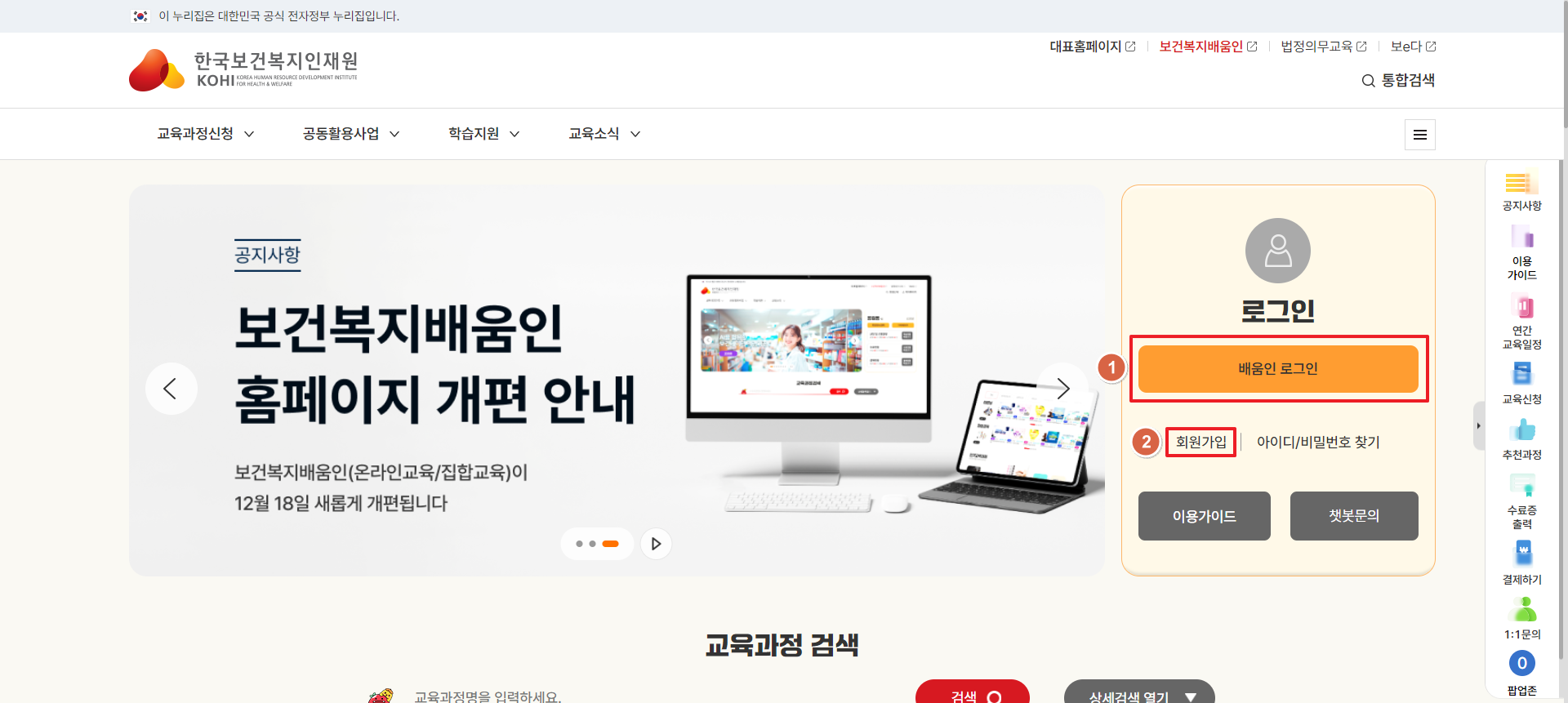
- 1Click the Login button, To go to the Login page. (You must be registered before you can login.)
- 2Click the Sign up button, to register.
2. Choose the member type

- 1
- - Click the Sign up button, The sign-up process begins.
- - The process is “Terms & Conditions agreement > Verify yourself > Input details > Sign-up completed”.
- 2Guidance for completing your registration appears on the page.
3. Terms & Conditions Agreement

- 1Review the Terms & Conditions and Privacy policy, and if you agree, Click the button.
- 2If you click the cancel button, you will return to the Main page.
- 3
- Click this button, to be taken to the next step. (Verify yourself)
You must agreen with the Terms & Conditions and Privacy policy to continue.
4. Verify Yourself

- 1Use the phone number account opened under your real name, to verify yourself.
- 2
- Enter I-PIN to verify yourself
You can choose one option to verify yourself, by phone or I-PIN.
- 3Click this button, You will be taken to the previous page. (Terms & Conditions Agreement)
5. Input Details
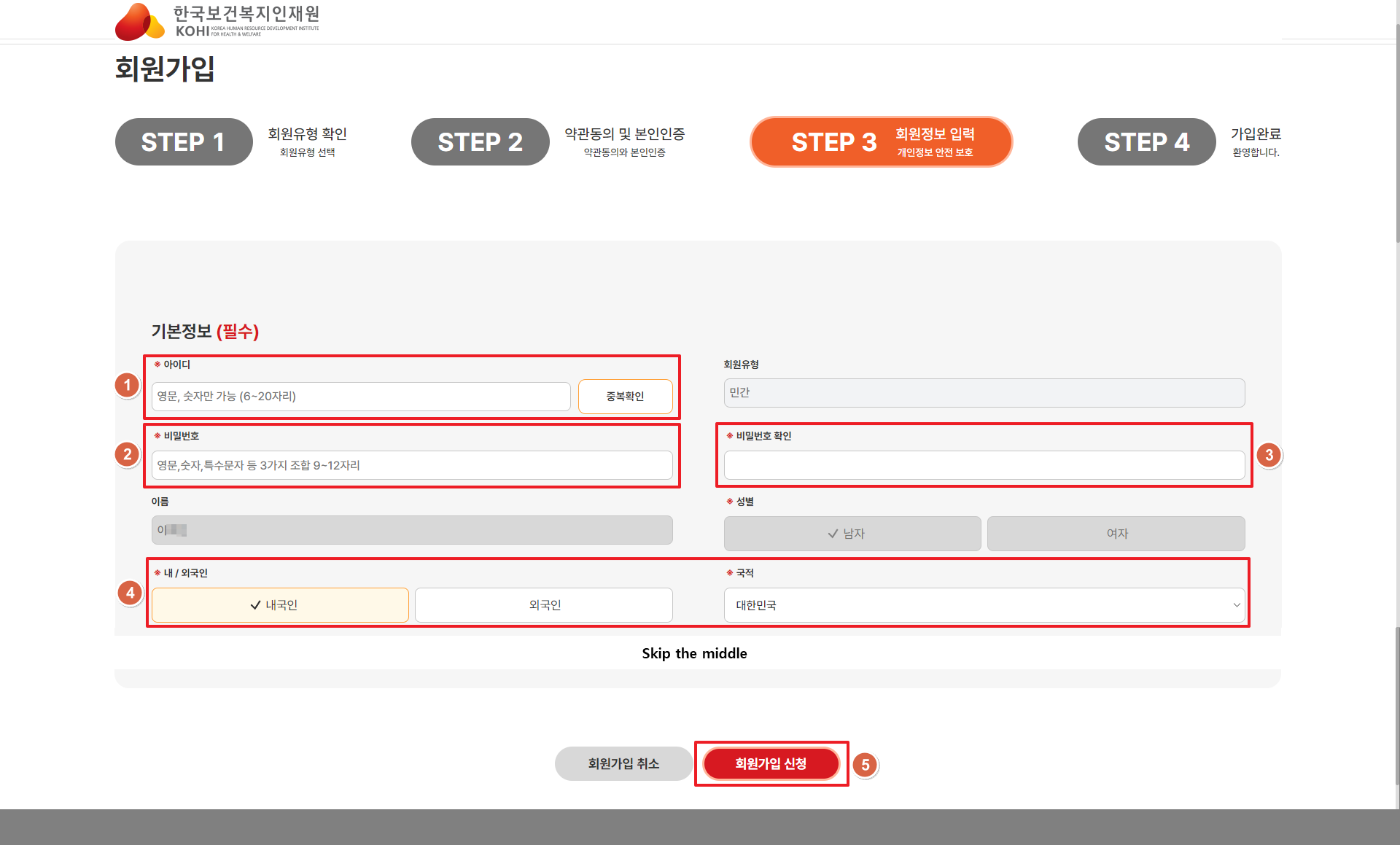
- 1
- - Create an ID and Click 중복확인 button.
- - If a duplicate ID exists, a message “There is a duplicate ID” will be displayed.
- 2
- Create your password to login.
Password must contain, letters, numbers and special characters.
If must include at least one upper case letter and one special character and be 9-12 characters long.
- 3
- - Confirms password meets conditions.
- - Enter the password( 2 ) a second time to confirm password.
- 4
- - Select if you not Korean or foreigner.
- - If you choose foreigner, also select your nationality.
- 5When you have completed all the required information, Click here ( 회원가입 신청) apply for registration.
6. Sign up Completed
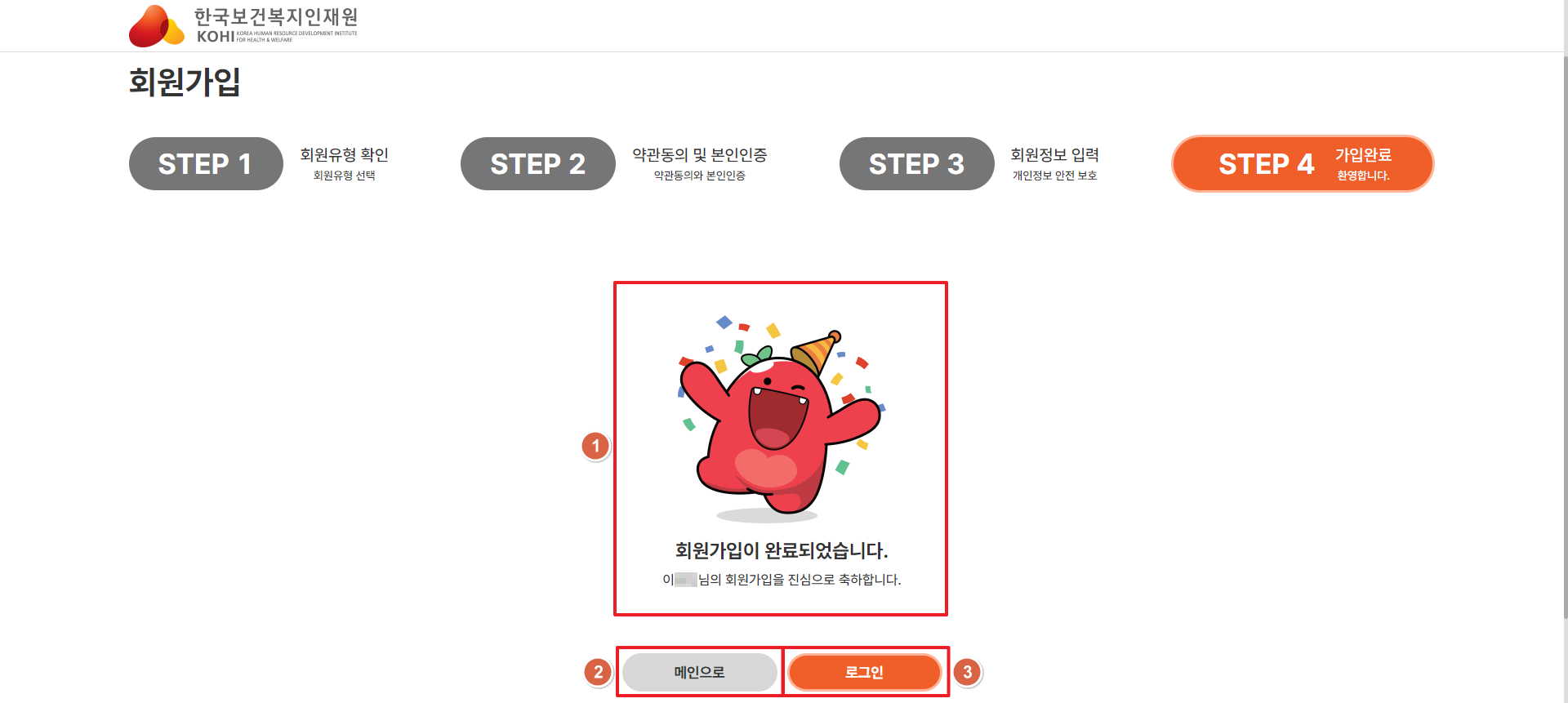
- 1The screen is displayed after successful application.
- 2Name, Member type, ID is displayed.
- 3Click this button to return to the Main page.
- 4Click this button to login.
7. Login
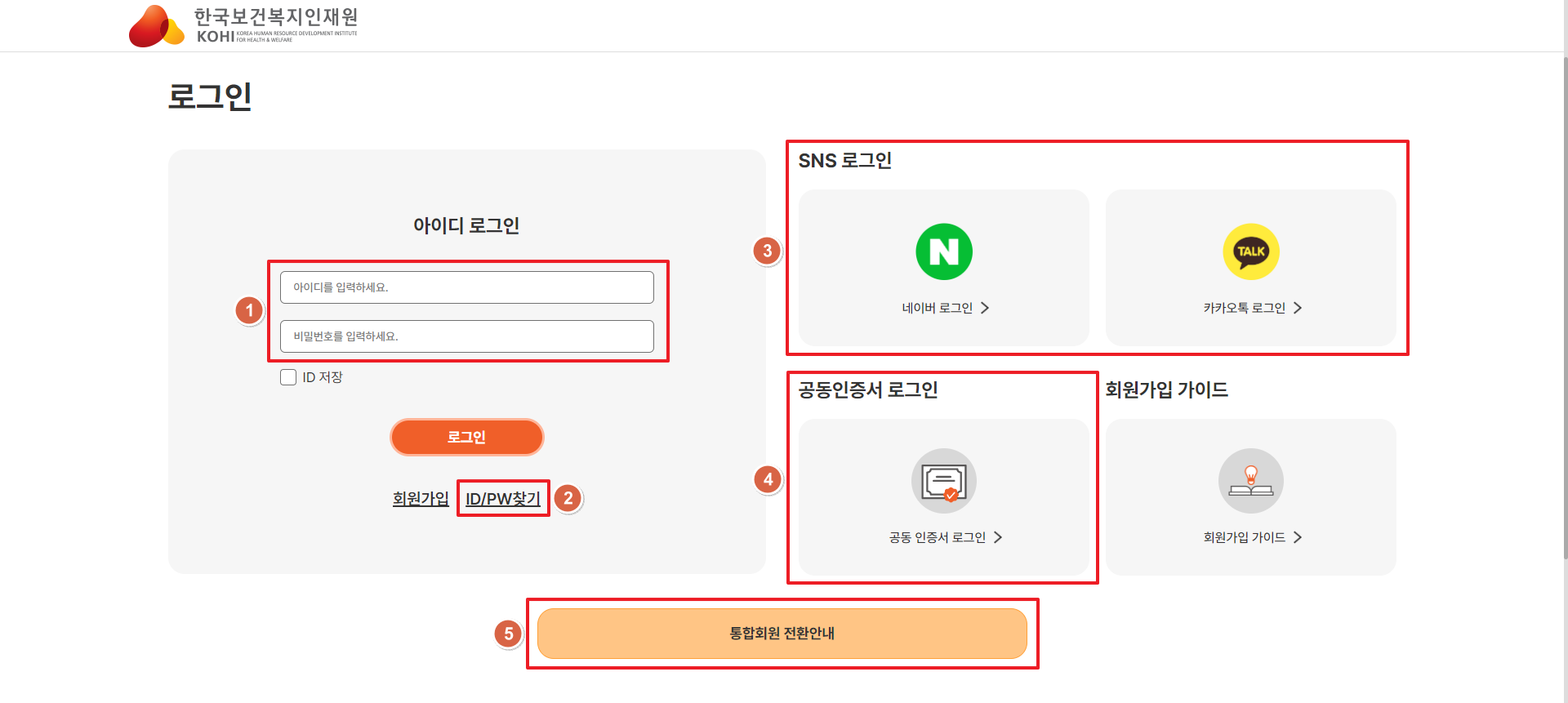
- 1
- - Enter your created member ID and password, And Click the login button.
- - If you forget your ID or password, Click here ( 2 ) to find.
- 2Click this button to find ID/Password.
- 3
- NAVER or KAKAOTALK SNS account can be used to login.
After you connect ‘My page(마이페이지) > My information(회원정보)’ page, You can use.
- 4
- Certificate Login.
After you resister ‘My page(마이페이지) > My information(회원정보) > Certificate Management(공동인증서 관리)’ page, You can use.
- 5Associate Member Login.
- 6
- - Click here to go to information page about integration of related organizations.
- - Integration of related organizations site.
- 1) KOHI main homepage : www.kohi.or.kr
- 2) Cyber Education : cyber.kohi.or.kr
- 3) Health Industry : hie.kohi.or.kr
- 4) Combined Health Enhancement : inhealth.kohi.or.kr
8. To find ID

- 1Enter name and phone number and Click this button. ( 아이디 찾기 )

- 2
- If entered information is correct, This page will display. But not display full name.
- If you want to display the full name, Click here. ( 3 )
- 3When you click this button ( 인증번호 발송 ), a generated code will be sent to your phone.
- 4Enter the code received on your phone.
- 5If you enter the correct code, the full name will be displayed.
8. To find Password

- 1
- Enter your ID, name and phone number, Click here ( 2 ) to verify.
If your details are correct, you will receive a phone message was initialized.
- 2You can verify by phone or I-PIN. Please choose option.
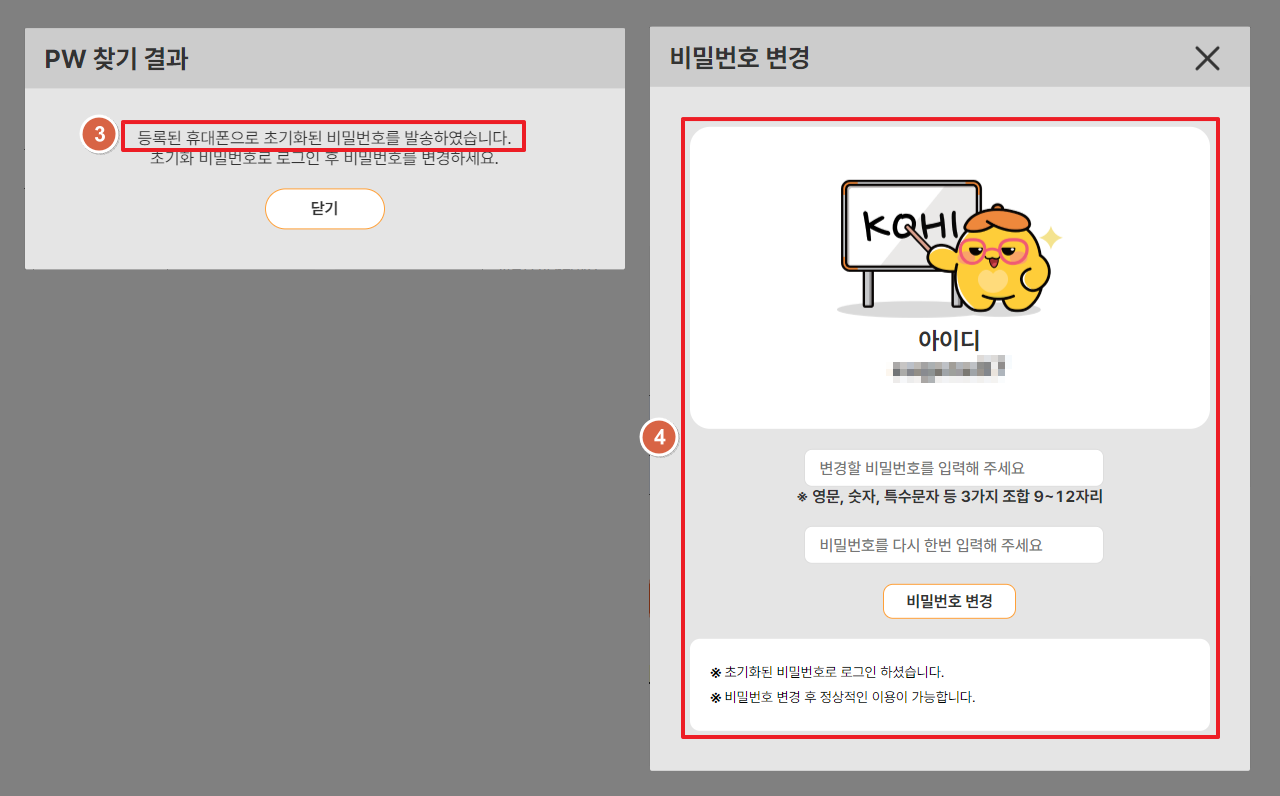
- 3If your verification by phone or I-PIN is successful, You will see this page.
- 4
- - After your password has been reset, you will see this page.
- - After you login with your reset password, you must change A new password.